Function Background / Overview
At Deepcoin, all trades (Spot, USDT Perpetual Pro Contract, Inverse Perpetual Contract, etc.) incur trading fees, which are an important part of users' trading costs. The fee rates vary depending on the business line, order type (Maker / Taker), and user level. This article explains the standard fee rates, calculation formulas, examples, and related risk control tips for each business line to help you accurately assess transaction costs and optimize your order strategies.
Core Terminology Definitions
Terminology | Meaning | Typical scenario |
Maker (Limit Order) | Maker refers to the act of placing an order into the order book that does not get filled immediately. Users who do this are "providing liquidity" to the market, as their orders wait for others to fill them. This usually involves placing limit orders, such as buy orders below the current market price or sell orders above the current market price. | For example: If the current price of BTC is 112,000 USDT and a user places a buy order at 112,800 USDT, this order will not be filled immediately but will instead enter the order book as a "pending order." If someone is willing to sell BTC at 112,800 USDT, then this pending order will be taken by the Taker and executed. |
Taker (Market Order) | Taker refers to an order that is immediately matched with an existing order in the order book, meaning it "takes" the existing liquidity from the market and thus "consumes liquidity." This usually happens when using a market order or a limit order with a price sufficient for immediate execution. | For example: If the current best ask price for BTC is 30,000 USDT and a user places a market buy order for 1 BTC, the system will immediately match and execute the 30,000 USDT sell order. In this case, the user is considered a Taker. |
Contract Size | Contract size refers to the value of the underlying asset represented by each contract, and it is typically used to calculate profit and loss, margin, and funding fees. The contract size design varies among different contract products. | For example, the contract size of the BTCUSDT perpetual contract is 0.001 BTC. If you hold 100 contracts, your total position will be 0.1 BTC, and the value of your position is related to the mark price. |
Total Position Value | Total position value refers to the asset value corresponding to the contract positions that a user currently holds or has ordered. Total position value = contract quantity × contract size × current price. | For example: if a user buys 200 BTCUSDT contracts, with a contract size of 0.001 BTC and the current price is 30,000 USDT, then the total position value is 200 × 0.001 × 30,000 = 6,000 USDT. |
Transaction Price | It refers to the price at which an order is ultimately executed, which may differ from the user's expected price at the time of placing the order, especially in the case of market orders or during periods of high volatility. The execution price will directly affect the user's opening cost and PNL calculation. | For example: when a user places a market order to buy 100 lots of the BTCUSDT contract, the system automatically matches the best sell orders in the order book depth. If the final average transaction price is 30,100 USDT, this will be the execution price for the user's trade. |
Quick Overview of Fees
Business line | Maker | Taker |
USDT Perpetual Contract | 0.02% | 0.06% |
Coin-margined Contract | 0.02% | 0.06% |
Spot Trading | 0.1% | 0.1% |
Detailed Explanation of Fee Types
USDT Perpetual Contract Trading Fees
Rate: Maker 0.02% / Taker 0.06%
Calculation Formula: Fee = Contract Size × Number of Contracts × Transaction Price × Fee Rate
Example
Suppose a user trades the BTCUSDT contract, with a contract size of 0.001 BTC per contract, which means each contract represents a value of 0.001 BTC.
Operation Type | Number of contracts | Contract Size (BTC/contract) | Transaction Price (USDT) | Fee Rate | Calculation process | Fee |
Maker places a limit order | 100 contracts | 0.001 BTC | 115,050 USDT | 0.02% (0.0002) | 0.001 × 100 × 115,050 × 0.0002 | 2.301 USDT |
Taker Market Order | 100 contracts | 0.001 BTC | 115,050 USDT | 0.06% (0.0006) | 0.001 × 100 × 115,050 × 0.0006 | 6.903 USDT |
Coin-margined Contract Trading Fees
Fee Rate: Maker 0.02% / Taker 0.06%
Calculation Formula: Fee = Contract Size × Contract Quantity / Transaction Price × Fee Rate
Example
Suppose Trader A buys 100 BTCUSD contracts at market price, and Trader B sells the same quantity of BTCUSD contracts (100 contracts) at limit price. After the order enters the depth, it is filled by another party, with the role as Maker.
Trading Role | Order Type | Contract Quantity (Lots) | Contract Size (USD/lot) | Transaction Price (USDT) | Fee Rate | Fee calculation formula | Fee (BTC) |
Taker (Market Order) | Market Buy | 100 | 100 | 100,000 | 0.06% | 100 × 100 ÷ 100,000 × 0.0006 | 0.00006 |
Maker (Pending Order) | Limit Sell | 100 | 100 | 100,000 | 0.02% | 100 × 100 ÷ 100,000 × 0.0002 | 0.00002 |
Spot Trading Fees
Fee Rate:
Maker: 0.1%
Taker: 0.1%
Calculation Formula:
Buy Fee = Buy Filled Amount × Fee Rate;
Sell Fee = Sell Price × Sell Filled Amount × Fee Rate
Example
Suppose Trader A buys 1 ETH at market price, and Trader B sells the same amount of ETH at limit price. After the order enters the depth and is filled by others, the role is Maker.
Operation Type | Trade Direction | Trade Volume | Transaction Price (USDT) | Fee Rate | Fee calculation formula | Fee |
Maker (Limit Order) | Buy ETH | 1 ETH | 4,000 USDT | 0.10% | 1 × 0.10% = 0.001 ETH | 0.001 ETH |
Taker (Market Taker) | Sell ETH | 1 ETH | 4,000 USDT | 0.10% | 4,000 × 1 × 0.10% = 4 USDT | 4 USDT |
Fee Inquiry
Contract (USDT Perpetual/Inverse Perpetual)
APP Side
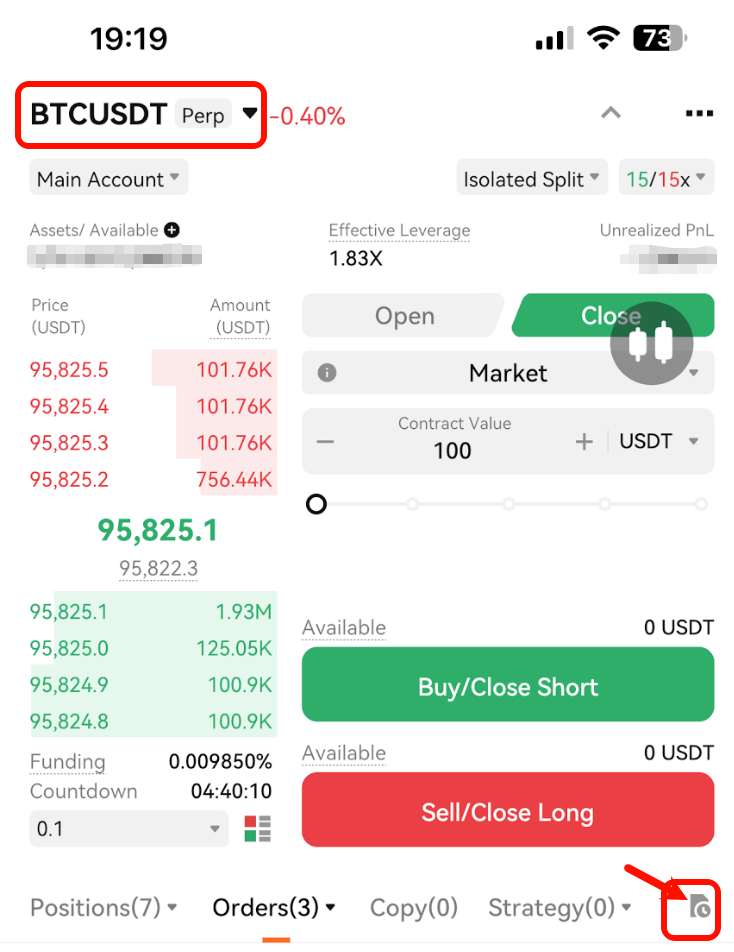
Step 1: After logging in, click "Trade" at the bottom of the interface, select the type of trade you want to view (USDT Perpetual/Inverse Perpetual), and click "History" as indicated on the right side of the image.
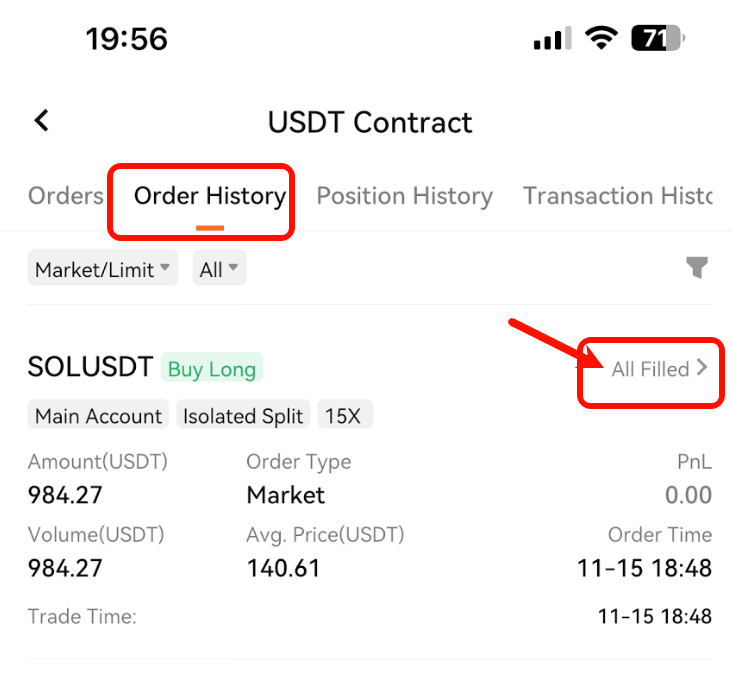
Step 2: Select the Historical Orders interface, and click "All Filled" on the right side of the order you want to view.
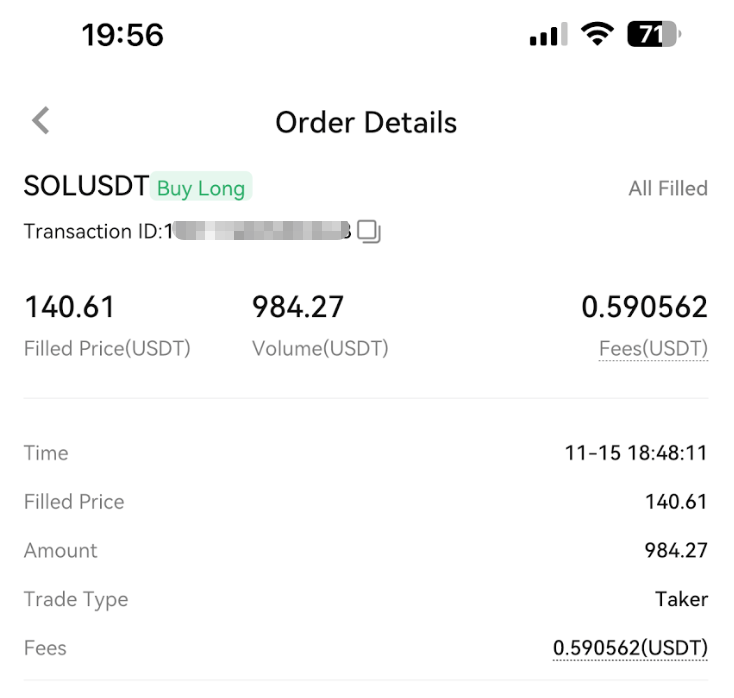
Step 3: You can view the details of each contract transaction, including order number, transaction time, average transaction price, transaction volume, transaction type (Taker/Maker), and trading fee
PC
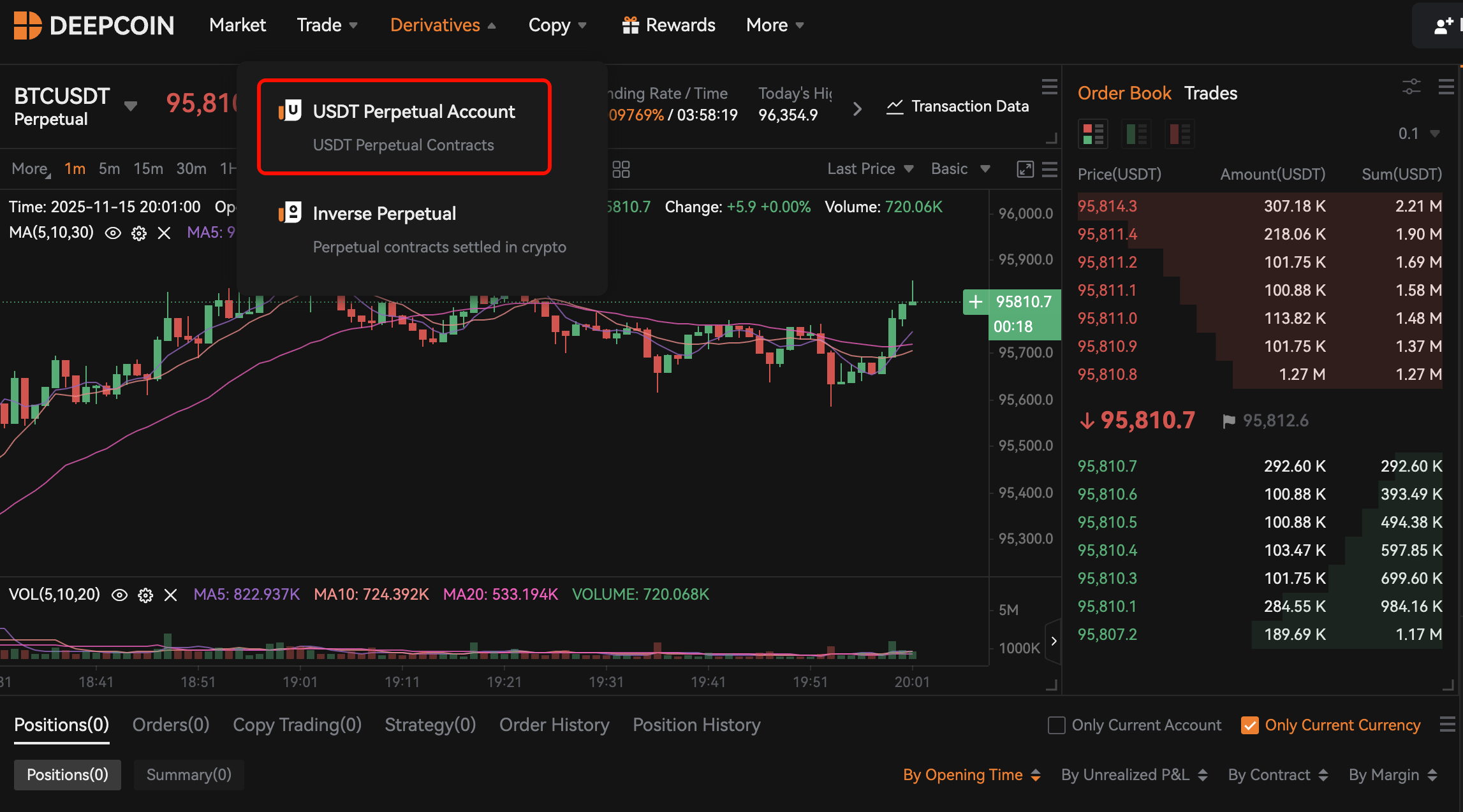
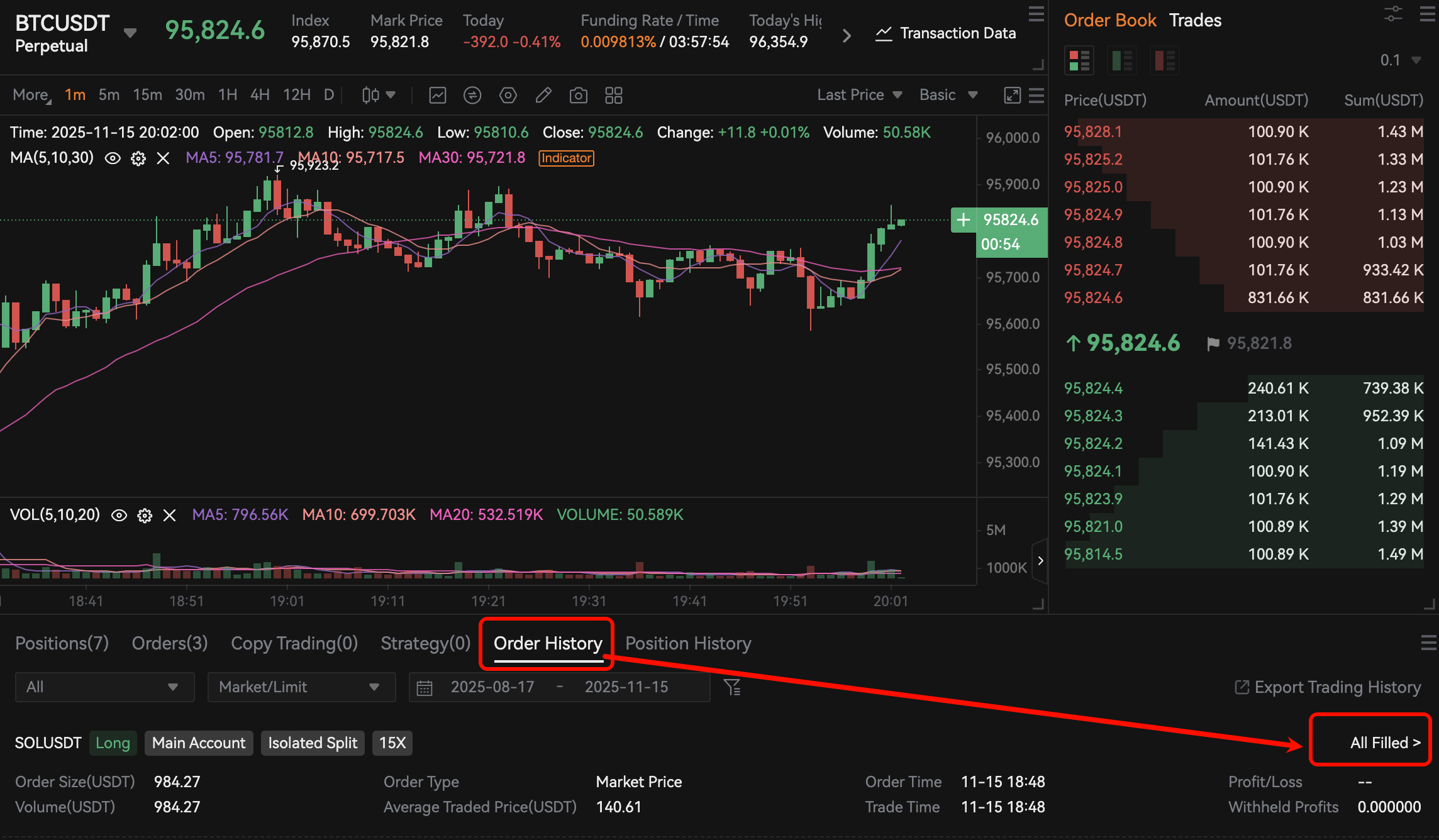
Step 1: After logging in, select the type of trading you want to view (USDT Perpetual Pro Contract/Inverse Perpetual Contract) from the derivatives menu.
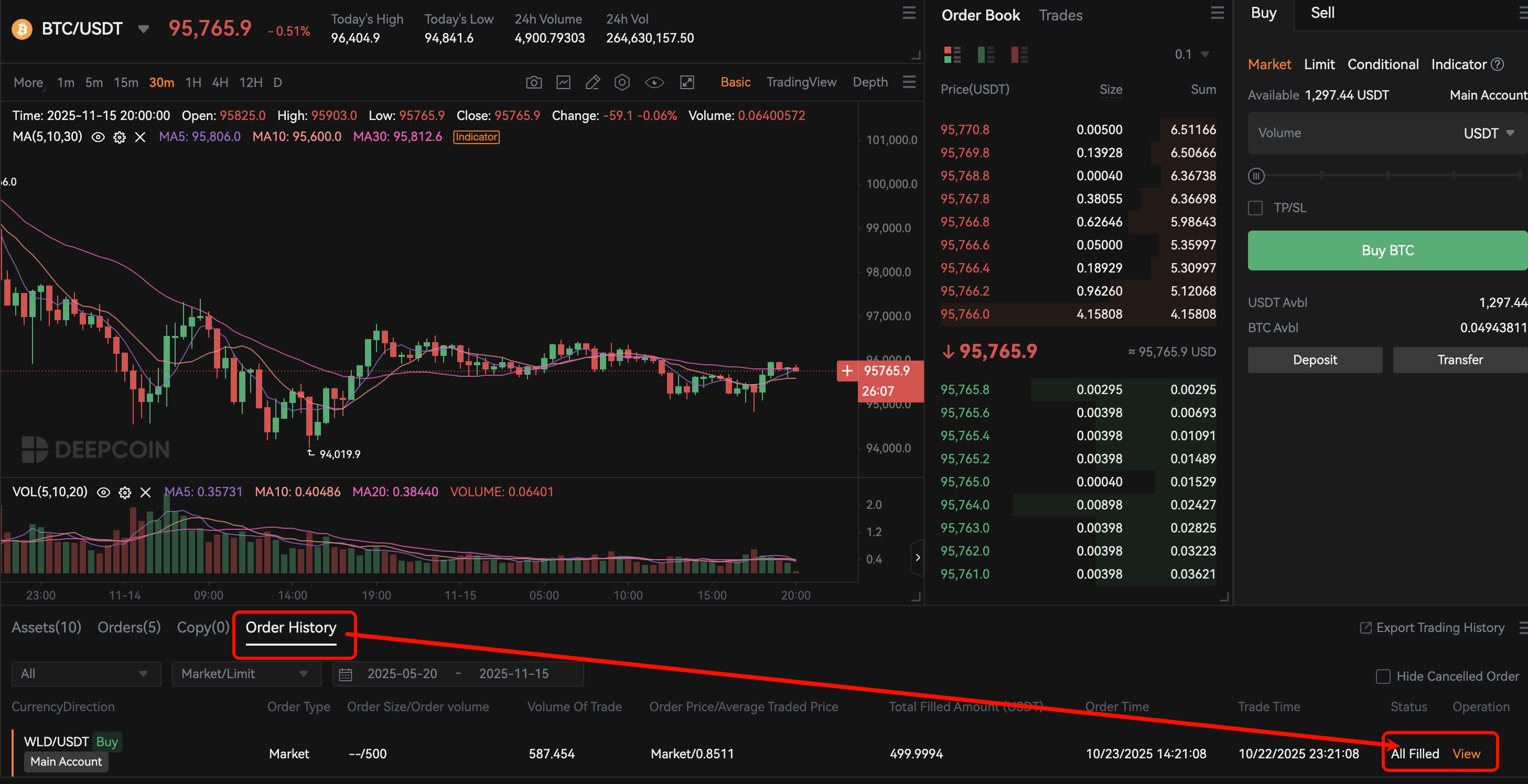
Step 2: At the bottom of the trading page, select "Order History", go to the order history records, and click "All Filled" on the right
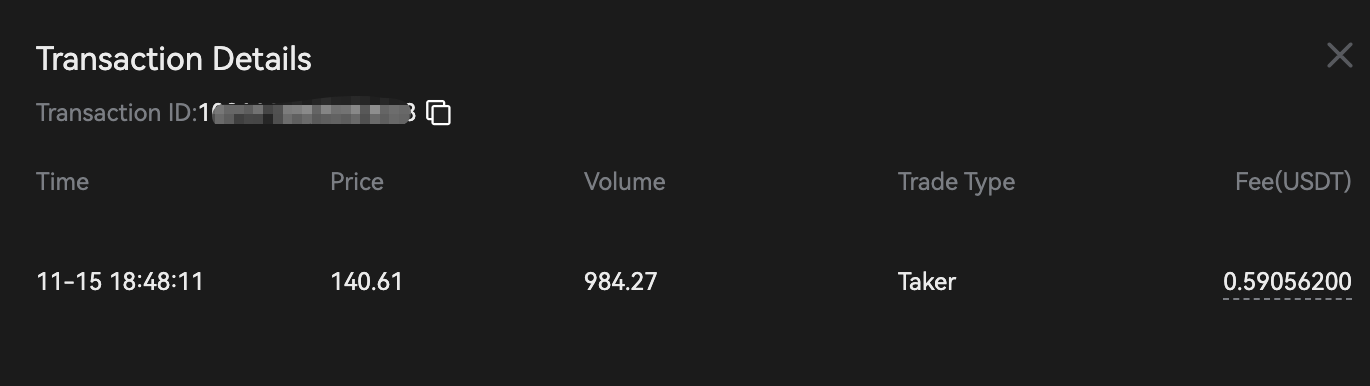
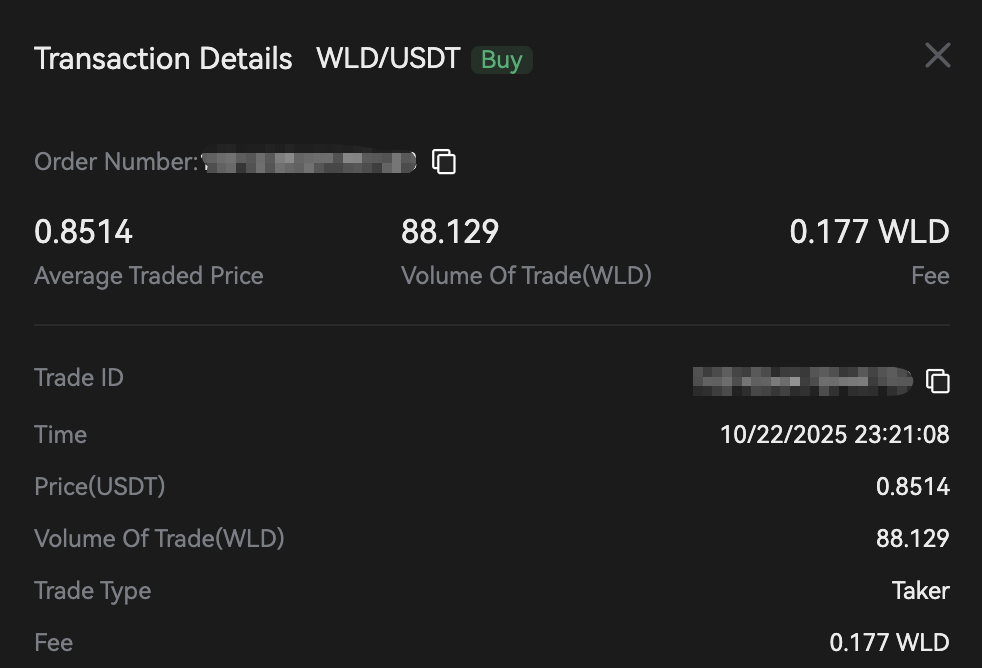
Step 3: You can view the details of each contract order, including Order ID, Transaction Time, Average Transaction Price, Transaction Volume, Transaction Type (Taker/Maker), and Trading Fee
Spot
APP
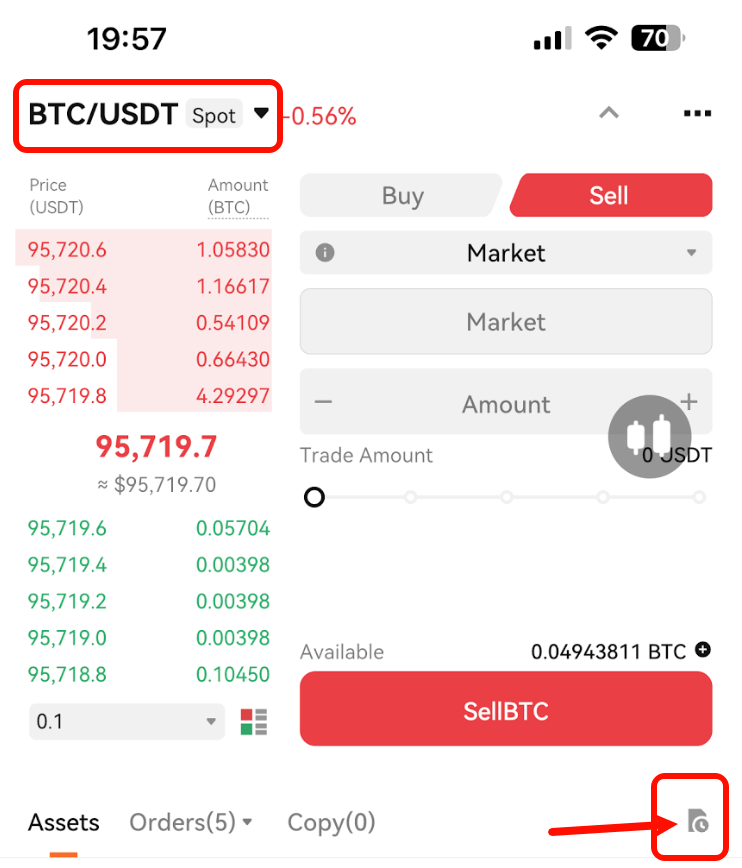
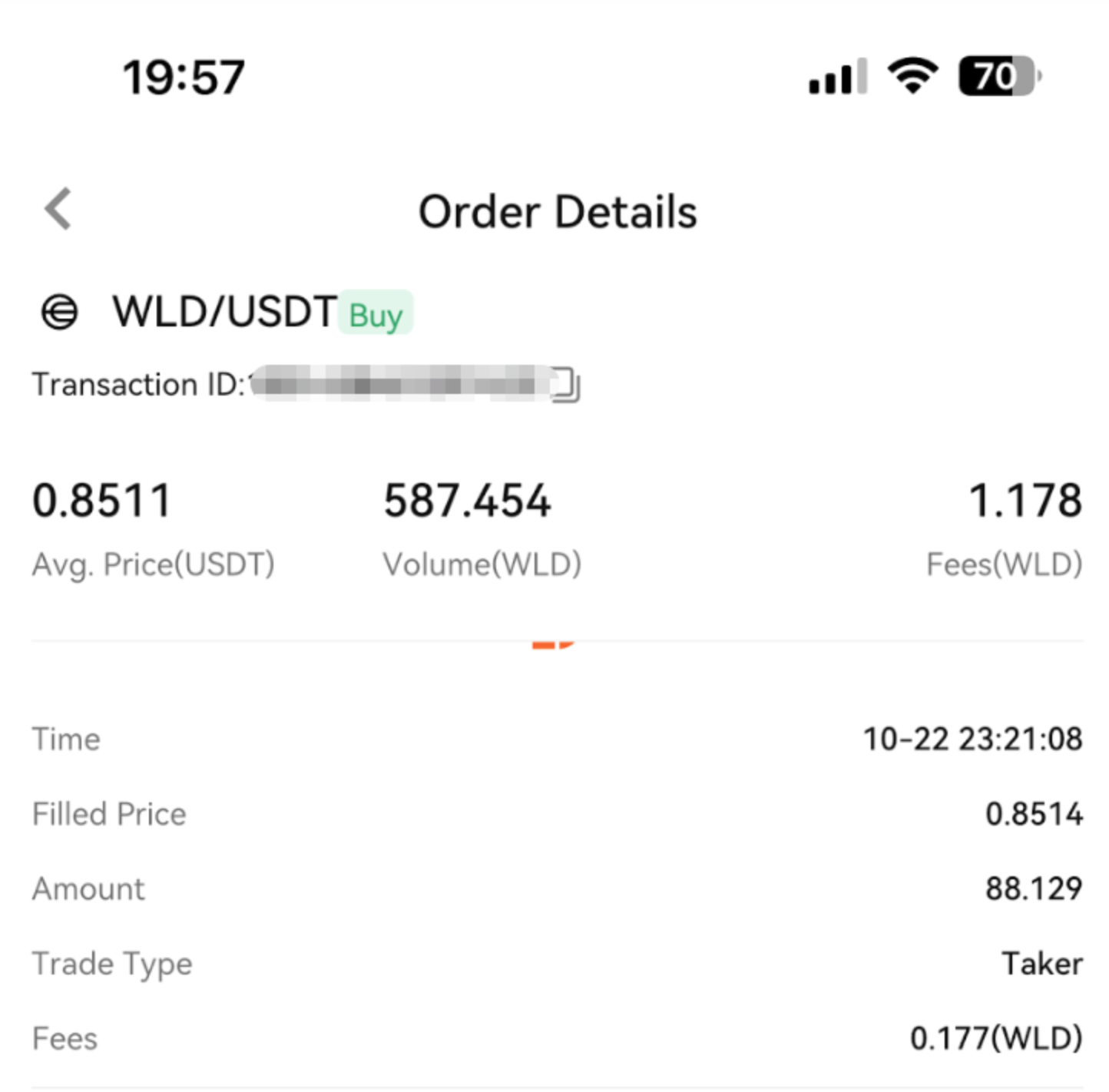
Step 1: After logging in, click "Trade" at the bottom of the interface, select the trading type you want to view (Spot), and click "History" marked on the right side of the image.
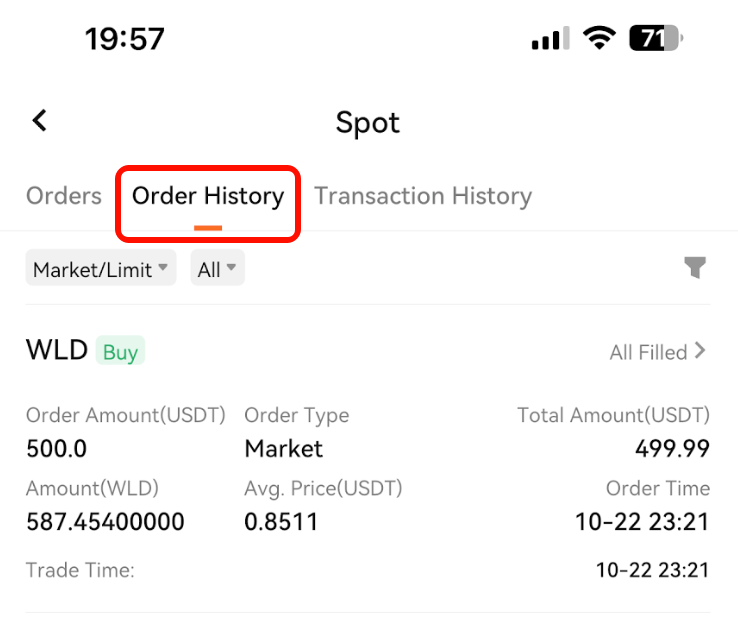
Step 2: Select the Historical Orders page, and click "All Filled" on the right side of the order you want to view.
Step 3: You can view the details of each contract transaction, including Order ID, Transaction Time, Average Transaction Price, Transaction Volume, Transaction Type (Taker/Maker), and Trading Fee
PC
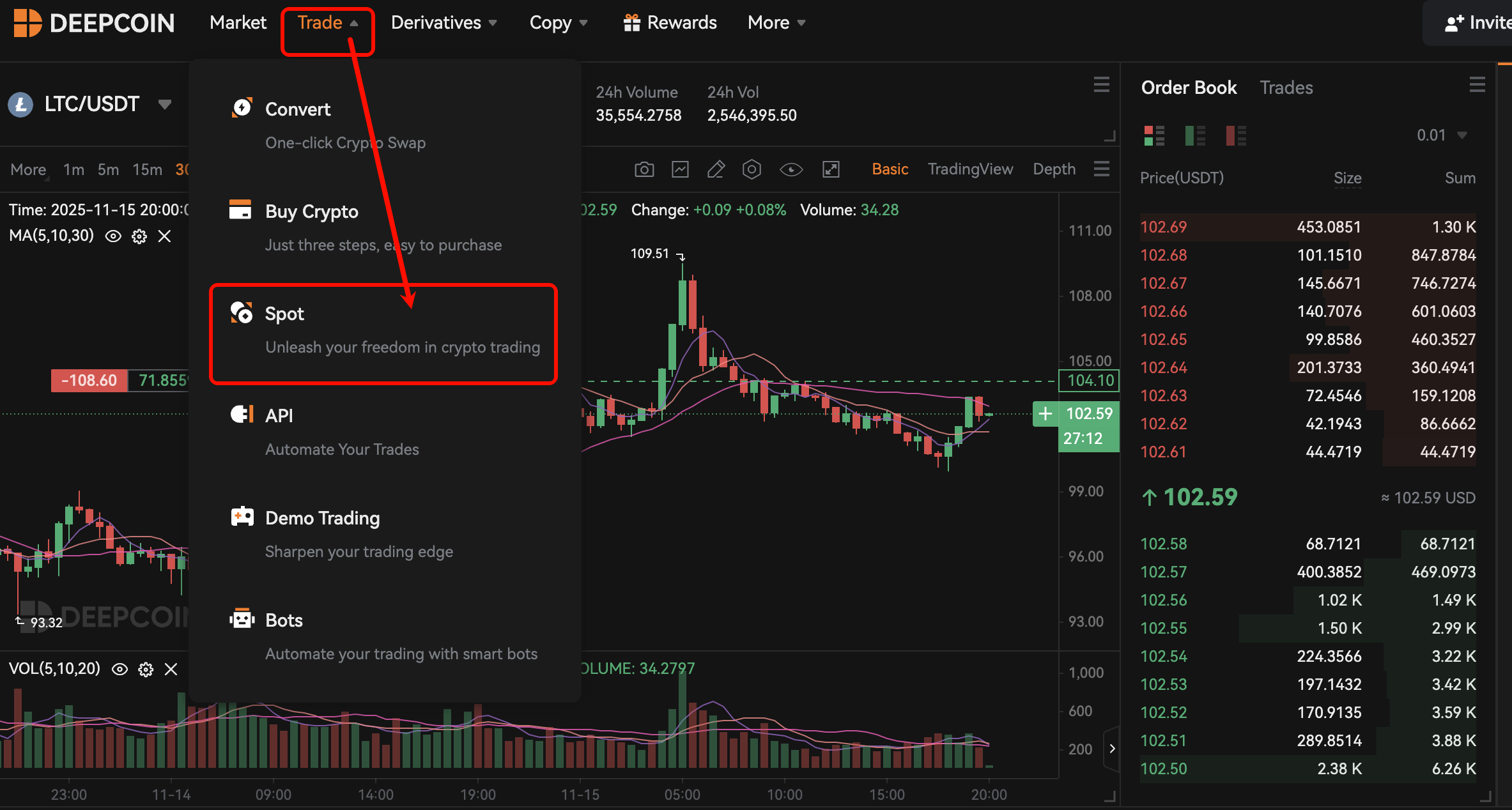
Step 1: After logging in, select "Spot" trading from the trading menu bar
Step 2: At the bottom of the trading page, select "Order History", go to the order history records, and click "All Filled" on the right
Step 3: You can view the details of each spot transaction, including Order ID, Transaction Time, Average Transaction Price, Transaction Volume, Transaction Type (Taker/Maker), and Trading Fee
Customer Support Channels
Still have questions? You can click the [Customer Support Icon] on the right to contact us immediately. We are available 24/7 and happy to assist you.